WebMCP & The Agentic Shift: Is Your Business Infrastructure Ready for 2026?
The foundations for the new internet agent highway are already being laid. WebMCP (Web Model Context Protocol) is a new, proposed web standard from Google that transforms how AI agents interact with the internet.
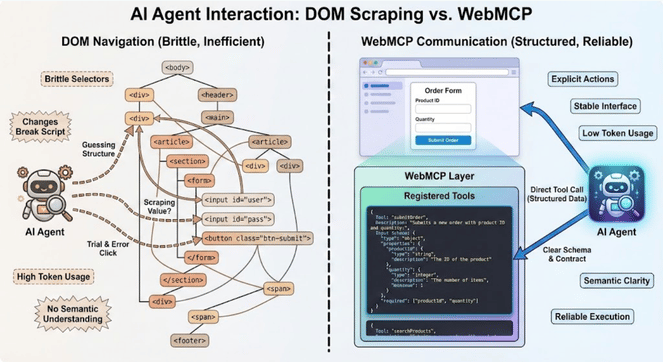
Up until now, AI agents have had to deal with website by “vision-processing” – taking screenshots, using OCR (optical character recognition) tools, and guessing which HTML button to click. WebMCP replaces this brittle “pixel-scraping” model with a formal tool contract between the website and the AI agent.
In simple terms WebMCP enables your website to provide tools to AI Agents.
The End of “Guesswork” Automation
For the last decade, web automation has been a game of “cat and mouse”. Before the era of AI, traditional bots were based on rigid “rule-based” logic (think Python/JavaScript scripts). If a bot needed to scrape a price from a travel site, a developer had to write specific code to find a very specific “div” tag in the HTML (I’ve been here and it’s never as easy as it seems!).
The problem with this? The web is living code. The moment a site’s structure changes its layout, or code – the bot would break and require re-development. Even in today’s automations – many workflows still rely on simple HTTP requests to hit a website, scrape the HTML, and then parse through a structure.
With the rise of Large Language Models (LLMs), navigating dynamic structures of websites has become significantly easier. AI agents got “eyes” with computer vision models, the ability to take screenshots and see the UI, or the ability to parse through 1000’s of lines of complex HTML code to find what it needs – even if the structure changes.
Even this methodology is a hack – and nowhere near the accuracy required for agentic capabilities as we approach the era of autonomous agents for UK businesses. Think about it – if we build an AI agent to source the best travel prices, and ultimately purchase flights, we need to make sure that the agent can:
- Understand multiple, complex UIs from different websites – all structured differently
- Find pricing information on different websites with non-standard tags and HTML
- Have fallback paths and retry methods if the site blocks it or the agent gets stuck
WebMCP is poised to end this struggle. It moves us from bots that “scrape” to agents that can “invoke”, and creates a machine-readable web.
From Visual Guesswork to the “Tool Contract”
WebMCP represents a fundamental shift from visual inference to structured intent. It replaces the guesswork with what we call a Tool Contract.
Instead of the agent looking at your website, your website formally introduces itself to the agent. Through the WebMCP protocol, your site publishes a manifest of exactly what it can do.
The Old Way: The agent thinks: “I need to find a <button> that has some variation of ‘Submit’ – hope it’s not hidden behind a cookie banner, and try to click the centre of it.”
The WebMCP Way (Contractual): The agent thinks: “I have been granted access to the book_appointment() tool. I will not execute it using these three pre-validated parameters from the schema I’ve been provided: date, service_type, and email.
A “Contract” is Better Than a “Click”
This is about deterministic reliability. If you’ve ever built automations and agents that depend on navigating website structures, you’ll know how messy it can get.
When a website and an agent agree on a “Tool Contract”, they are using a shared language that bypasses the messiness of the visual web:
- Schema Validation: In the old days, a bot might try to put a name or an email into a phone number form field, causing a failure. Now, the website tells the agent exactly what data it requires. If the agent provides the wrong format, the browser catches it before the request even hits your server.
- Bypassing the UI: WebMCP tools connect directly to your site’s underlying JavaScript logic. The agent doesn’t need to wait for images to load, CSS to render, or the ultimate agent-killer – an interstitial “Sign up to our Newsletter” pop-up. The AI agent interacts with the functionality, not the UI or decoration.
- Resilience to Design Changes: At flowio, we see businesses hesitant to update their site for fear of breaking workflows dependent on finding information or interacting with them. With WebMCP, you can completely redesign your front-end, change colours, move menus, or refactor code into a completely different language – as long as the WebMCP tool registration remains the same, your workflows and agents will persist.
In the agentic era, your website’s UI is for humans, but it’s WebMCP Manifest is for business.
By providing this “highway” for AI agents, you’re ensuring that your website is easy for the next generation of AI assistants to work with.
The Two Paths to Readiness (HTML vs. JS)
For most UK business owners, “implementing a new web standard” sounds like a 12-month engineering project. But WebMCP is designed to be a progressive enhancement. You don’t need to rebuild your site; you just need to annotate it.
Think of it a little like SEO. You didn’t rewrite your content for Google; you just added some meta tags, and schema so search engines could understand your content better. WebMCP offers two distinct paths to get your business “Agent-Ready”, depending on your technical resources.
1. The Declarative Path (Low-Code/No-Code)
Best For: Small businesses, Shopify stores, and basic lead-gen sites.
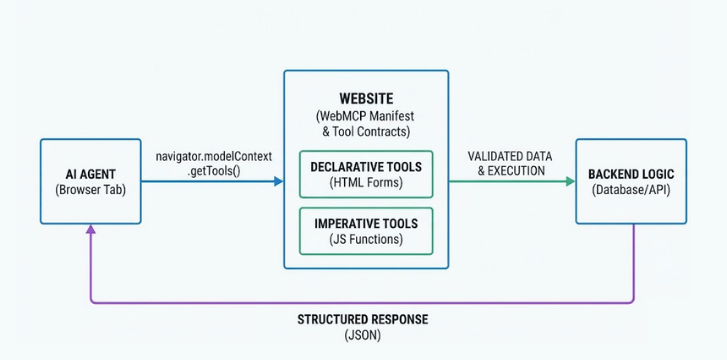
If your website already has well-structured HTML forms (like a “Contact-Us” or a “Get a Quote” box), you are 90% of the way there. The Declarative API allows you to upgrade your existing forms into AI tools simply by adding a few attributes:
- toolname – Give the form a clear, machine-readable name (e.g. request-quote)
- tooldescription – Explain to the AI what the form does (e.g. Calculates a bespoke price for garden landscaping based on square footage)
- toolautosubmit – A “power-user” flag that allows the agent to submit the form once it has filled in the fields.
The result: Instead of an agent trying to find your submit button to make purchases or submit an enquiry, the browser automatically generates a tool schema from your form fields. Your human-facing form is now an AI-facing API.
<form action="/search" toolname="product_search" tooldescription="Search our catalogue for items"> <input name="q" type="text" placeholder="Search products..." /> <button type="submit">Search</button> </form>2. The Imperative Path (High-Performance)
Best for: SaaS platforms, complex booking systems, and tech-forward agencies.
For more dynamic interactions – like a real time inventory checker or a multi-step shipping calculator, you’ll want to use the Imperative API. This lives in your site’s JavaScript and uses the navigator.modelContext.registerTool function.
This is the “expert” route. It allows your developers to wrap your existing front-end logic (the code that already runs your site) and hand it directly to the AI.
Precision Control: You define exactly what inputs the agent can send (Using JSON Schema) and what the agent gets back.
Speed: Because it calls the JavaScript function directly, it bypasses the “visual” layer entirely.
Context Aware: You can register and unregister tools on the fly. If a user is on your “Pricing” page, you might register a calculate_bulk_discount tool that doesn’t exist on the homepage.
An example of registering a dynamic tool with the JavaScript function:
// Registering a dynamic tool for an AI agent
navigator.modelContext.registerTool({
name: "get_delivery_estimate",
description: "Calculates the estimated delivery date based on a UK postcode.", parameters: {
    type: "object",
    properties: {
         postcode: { type: "string", pattern: "^[A-Z]{1,2}[0-9R][0-9A-Z]? [0-9][ABD-HJLNP-UW-Z]{2}$" } } },
    execute: async ({ postcode }) => {
    const days = await calculateShipping(postcode);
    return { estimated_days: days }; }
});
Which one is right for you?
| Feature | Declarative (The Low-Code Path) | Imperative (The High-Performance Path) |
|---|---|---|
| Best For | Standard forms (lead gen, search, sign-ups etc.) | Dynamic logic (calculators, live inventory, dashboards etc.) |
| Implementation | Adding attributes to existing HTML | Writing custom JavaScript functions |
| Expertise Needed | Junior Developer / Marketing Ops | Full-Stack / Senior Developer |
| Speed to Market | Minutes – ideal for testing the water | Hours/Days – for core business infrastructure |
| User Experience | Pre-fills the form for human review | Executes “behind-the-scenes” (if permitted) |
| Reliability | Relies on the standard browser form handler | 100% deterministic via JSON Schema |
While WebMCP is a completely new web standard in very early preview – at flowio we’d recommend looking into getting started with the Declarative Path for most businesses. It’s low-risk, takes minutes to implement, and immediately makes your website more “callable” for the next generation of browser agents. As your automation needs grow, layer on Imperative tools for your most high-value tasks.
What WebMCP Will Look Like for Real-World Use Cases
Now that we know we can provide a “Tool Contract” to an AI agent visiting our website, and how implementation might look like in practice – I’m sure you may be wondering how it all applies to your own business website?
Here is how WebMCP will look in practice for four common business sectors:
1. Customer Support: Submitting Support Tickets
The Problem: An AI Agent tasked with filling in a support ticket form has to navigate different form fields, rely on form labels to understand what information to fill in. The agent gets stuck on form validation, and inputs wrong data.
The WebMCP solutions: Your ticketing site exposes a support_ticket tool.
The Agent Says: “I’m adding name, email and technical_detail fields and auto-submit”.
The Site Responds: The support ticket is submitted, assigned to “John”, and will be responded to in 1 hour.
2. Professional Services: Intelligent Booking Systems
The Problem: Booking a discovery call often involves a “back and forth” on a calendar widget or API that AI Agents struggle to “see” correctly.
The WebMCP Solution: You annotate your calendar booking for with the Declarative API (toolname=”book_consultation”).
The Agent Says: “I see you have an opening on Wednesday at 10 AM. I’ll fill in the name, email, and consultation_type fields and auto-submit.”
The Site Responds: The booking is confirmed, and the lead is in your CRM without the user ever touching the mouse.
3. Travel: Complex Itinerary Management
The Problem: Booking a flight usually requires distinguishing between “Full Legal Name,”, “First Name”, and “Middle Names” – a minefield for any AI agent that often leads to failed bookings, and why at this point in time autonomous flight booking agents hardly exist.
The WebMCP Solution: The airline exposes a book_flight tool with a strict JSON Schema.
The Agent Says: “I am mapping the user’s passport data directly to your passenger_manifest tool”.
The Site Responds: The data is validated instantly. No more “invalid fields” errors or rejected payments due to formatting errors.
4. Service & Maintenance: One-Click Diagnostics
The Problem: A customer has a problem with their smart boiler. They contact support, and the agent has to walk them through five different nested settings menus to find an error code.
The WebMCP Solution: Your support portal exposes a run_diagnostics tool (Imperative API).
The Agent Says: “I’ve detected a fault. I’m calling the run_diagnostics function on the user’s dashboard.”
The Site Responds: It pulls the technical logs directly and hands them to the AI, which then explains the fix to the customer immediately.
These examples aren’t futuristic “maybe” scenarios, they are basic functions for thousands of modern websites. Automations and agents right now struggle with this functionality on websites due to poor UI, fuzzy logic and inability to navigate complex code. With WebMCP, you create the environment for AI Agents to communicate and use your site independently – all without human intervention.
The Agentic Stack – UCP, WebMCP, and the Markdown Revolution
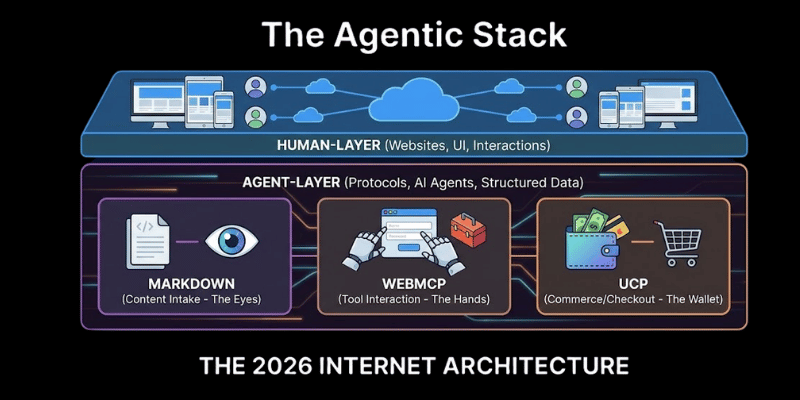
We’ve previously written up our thoughts on the Agentic Commerce Protocol (ACP), Universal Commerce Protocol (UCP), and now WebMCP. We are witnessing the birth of an Agentic Stack that will define the next generation of the internet in 2026 – an internet where there is a “Human-Layer” (websites, UI, human interactions), and an “Agent-Layer” (WebMCP, UCP, and Markdown language).
WebMCP is the interface for agents, and these other protocols are the plumbing and the language.
The Universal Commerce Protocol (UCP): The Buy Button for Agents
Last month I wrote a post on the Universal Commerce Protocol, which launched in January 2026 from Google and Shopify (supported by payment gateway giants such as Stripe, Mastercard and platforms such as Etsy) – UCP is the “wallet” of the agentic web.
While WebMCP allows agents to fill out a form on your website without friction, UCP allows that agent to actually complete a purchase across different platforms without needing a custom integration for every store. It standardises the “checkout language”.
The flowio take: UCP solves the “NxN integration problem”. You don’t need a specific bot for Shopify, and a different one for Amazon. You implement UCP once, and every compliant agent – from Gemini to ChatGPT can handle the transaction.
Cloudflare’s “Markdown for Agents”: Reducing the Noise
The most recent update to the Agentic stack is Cloudflare’s Markdown for Agents (released February 2026). As we discussed “pixel-scraping” can be expensive, and often fail. AI models charge by tokens, by the numbers of words/characters processed. Raw HTML can be incredibly noisy, and token-heavy to process.
Cloudflare now allows your website to automatically detect when an AI agent is visiting and serve it a clean, Markdown version of your page instead of a messy HTML blob.
- 80% Token Savings: Early data shows that converting a page to Markdown reduces the data an agent has to “read” by up to 80%.
- Speed & Accuracy: By stripping away the scripts (JavaScripts/CSS etc.), you make it easier for the agent to find the facts (like your price or shipping policies and harder for it to get distracted by a sidebar.
The 2026 Agentic Hierarchy
| Protocol | Role | Analogy |
|---|---|---|
| Markdown (Cloudflare) | Content Intake | The Eyes: Reading the facts efficiently. |
| WebMCP (Google) | Tool Interaction | The Hands: Clicking buttons and filling forms. |
| UCP (Shopify/Google) | Commerce/Checkout | The Wallet: Paying and confirming the order. |
Accessing WebMCP Just Now
As of February 2026, WebMCP is in an early developer preview. It is not yet available by default in the standard version of Google Chrome. WebMCP is currently living in Chrome 146+ (Chrome Canary and Dev channels). To access it today, you must have Chrome 146+ and initialise it by following these steps:
- Download Chrome Canary: Ensure this is on version 146.0.x or higher
- Enable Experimental Flags: Navigate to chrome://flags/#enable-experimental-web-platform-features and set it to Enabled.
- Relaunch: A full browser restart is required to inject the navigator.modelContext object.
- Debugging: Open Chrome DevTools (F12). In version 146, a new WebMCP panel has been added under the “Application” or “Sources” tab to help you inspect tool schemas and monitor incoming agent calls in real-time.
Another way to see what tools a website is offering to agents is to use the Model Context Tool Inspector extension available on the Chrome Web Store.
The Positive Shift For AI Agents & Automation
At flowio, we’ve built our fair share of AI agents and automated workflows for businesses that rely on understanding websites (e.g. for research discovery or knowledge bases), performing actions (such as booking calendar appointments etc.) – it can be highly complex to implement robust, scalable workflows that can deal with today’s website infrastructure.
Constantly changing HTML patterns, fuzzy logic, and poor structures can make outputs inconsistent for even the best agents relying on what they find within a website.
Take these automation use-cases for instance:
A B2B Sales Prospecting Agent
A B2B sales AI agent tasked at researching a lead’s website to find their latest case studies, features and contact details.
Today’s Struggle: In today’s world, building this type of workflow in a platform such as n8n would mean HTTP requests, parsing HTML, converting to markdown and information extraction via LLMs creating numerous stages of potential failure. The HTML may be too large to parse, footers, scripts, irrelevant divs, or the agent might have to navigate through multiple pages to get what it needs.
The WebMCP Automation Shift: The lead’s website serves Markdown for Agents, and registers a fetch_case_studies tool, alongside a get_official_contacts tool.
The Result: The agent pulls back a clean Markdown file with only the relevant information it requires, dropping token cost/usage by over 60% while improving the output accuracy to 100%.
Customer Support Agent
A customer support agent for an online retailer tasked at providing information about orders and refunds.
Today’s Struggle: Building an agent that could navigate to a “tracking page”, find the input field, type the number, and then try to scrape the status from a messy table. This type of agent would most likely have a 50% success rate trying to navigate complex, messy DOM elements, and inputting key data.
The WebMCP Automation Shift: The retailers portal registers a get_order_status tool.
The Result: The agent calls the function directly with the order ID and customer name. It receives a clean JSON response (e.g. status: “In Transit”, eta: “2026-02-18”). No scraping, no errors, and zero latency.
The shift to web standards that make the web accessible for AI agents, with Markdown helping agents find accurate data they need quickly without the token-burn, WebMCP giving the agent control to perform functions and access tools, and UCP allowing agents to complete purchases, the potential for fully-autonomous AI agents in 2026 has just become clear.
In Conclusion: The Agentic Era of The Web is Here
In 2026, the potential for fully-autonomous AI agents has shifted from a “maybe” to a “how soon.” By layering these standards together, we are moving away from brittle, bespoke bots and toward an Agentic Workforce that is:
- Cost-Efficient: No more “token-burn” on junk data.
- Scalable: One agent can interact with a thousand websites using the same protocol.
- Reliable: Built on “Tool Contracts,” not visual guesswork.
At flowio, we speak to businesses every day that are “experimenting” with AI. They have a ChatGPT window open, and maybe a few basic prompts. But 2026 is the year of Proof Over Promise. The shift from simple chat to Agentic Automation is where the real ROI lives, and WebMCP is the missing link that makes it scale.
For UK businesses, the goal is simple: Be the easiest business for an agent to work with. If your competitor’s site is a “black box” that an agent has to struggle to read, but yours is a set of “callable tools,” you win the customer.
The “Agent-Ready” Checklist
To wrap up your post, here is the immediate action plan for any UK business looking at 2026:
- Audit your “Action Points”: Where do users currently click to get value? (Booking, Searching, Buying), what tools can you make available
- Annotate the Low-Hanging Fruit: Add toolname and tooldescription to your primary lead-gen forms today
- Bridge the Gap with UCP: If you sell products, ensure your checkout flow is compliant with the Universal Commerce Protocol
- Clean the Data: Talk to your dev team about enabling Markdown for Agents via Cloudflare to save on token costs, whilst making your content readable for future AI assistants
“The highway is built. Don’t let your business be a dead end on the agentic map. At flowio, we’re ready to help you implement the complete Agentic Stack today.”
About the author

Malcolm Gibb — Founder & CEO // flowio
Hi, I'm Malcolm — Founder of flowio. I founded flowio after 15 years of leading performance marketing agencies. flowio exists to help businesses combine AI, automation and smart development solutions to solve critical business challenges. The content you read here is written by myself and based on experiences, insights and topical content from working with our clients.
Looking to speak to an expert to help your business scale? Whether you are starting your journey into AI strategy or need a full done-for-you automation solution, book a chat with us to discover where the opportunity exists.