Beyond Prompting: Building a Contextual AI PPC Analyst With Claude & Google Ads
“Scaling PPC expertise doesn’t scale.”
Every agency eventually hits the same invisible wall: your best Google Ads account managers are buried in repetitive analysis, and their “tribal knowledge”. The nuance of why a specific bid strategy was chosen or how a client’s seasonality actually behaves exists only in their heads. When a manager leaves, that strategy walks out the door with them.
I know it. I’ve been on both sides of the fence, from leading PPC agencies – to being the one that leaves with key account knowledge.
It has massive impact.
Account performance starts to degrade.
Clients start to leave.
What if you could “bottle” that senior-level judgement? Those individual processes that were built over years of working on client accounts? That historical context that only exists in the heads of the account managers?
It doesn’t involve simply connecting up your Claude account to Google Ads, and throwing it some prompts. Or, uploading CSVs into an LLM and hoping AI can analyse your data for you.
By using a layered implementation framework, you can move past generic AI prompts and build a system where Claude doesn’t just process or analyse data – it understands your client’s business strategy, objectives, historical wins, seasonality, and your agency’s unique optimisation “DNA”.
The Problem: The Three Walls of Agency Growth
Most agencies fail to integrate AI effectively because they treat every chat session as a blank slate. Claude doesn’t retain context or memory – especially in a company-wide context. That ad update that the PPC manager did last week? What about the audience strategy the PPC lead implemented last month? This is where AI integration within agencies leads to three primary points of failure:
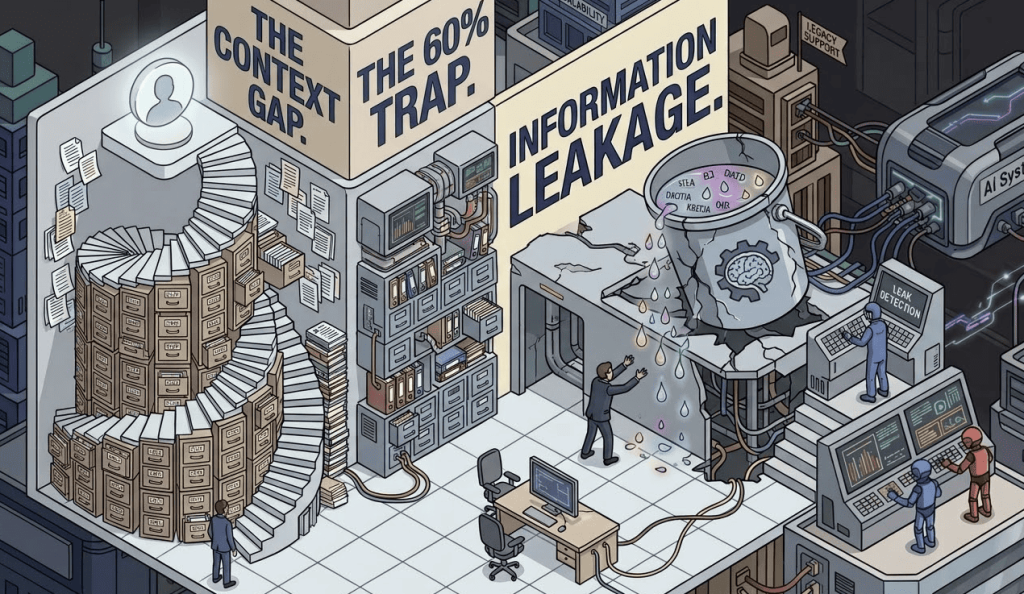
- The Context Gap: New managers take 3+ months to learn client nuances.
- Information Leakage: No system captures the “why” behind the past performance.
- The 60% Trap: Repetitive tasks like search term reviews and reporting eats into the majority of the work week.
To solve this, we move through a 6-Layer Framework designed to replicate how a senior analyst thinks and works within Google Ads – and can be implemented at a departmental or company-wide level, rather than becoming reliant on individual processes.
Layer 01: The Context Layer (The CCD)
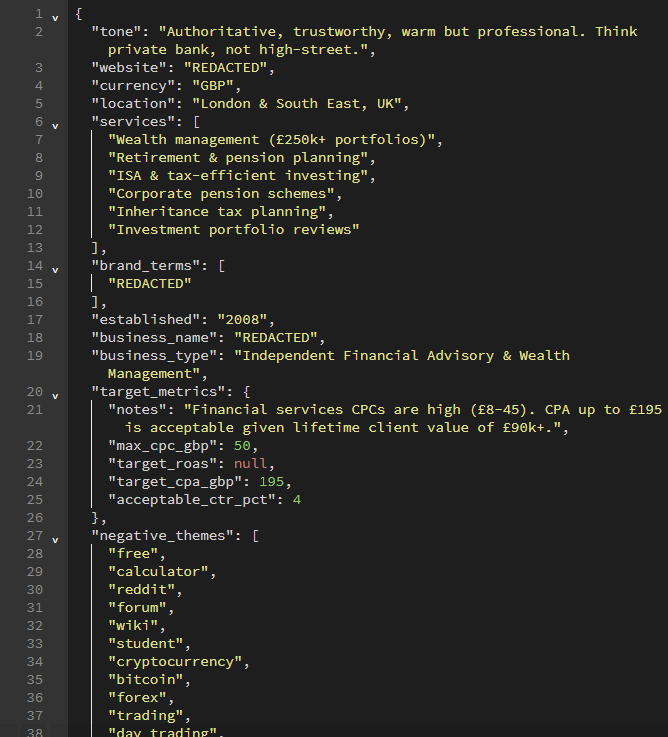
The Client Context Document (CCD) is the foundation. It is a living, brief that travels with every interaction, ensuring Claude “knows” the client as well as you do.
Example Format:
client_context_[client name].md# Client Context Document: [Client Name]
- **Brand Info:** Tone of Voice, Logos, Industry etc.
- **Product Focus:** Hero products, Services etc.
- **Customer Focus:** Target audience, Demographics etc.
- **Business Intel:** Vertical, AOV, LTV, and Margins.
- **Account Structure:** Naming conventions and campaign hierarchy.
- **Benchmarks:** Target CPA/ROAS and historical CTR norms.
- **Seasonality:** Key trading periods (e.g., "Peak starts Nov 1st").
- **Attribution:** Tracking setup and trusted conversion actions.
...This file can be as comprehensive, or concise as you like. It acts as a full “Brain” for that particular client, information that you should already have derived from briefs, account history and working with the client.
Another way to create this layer is to store it in JSON format. We utilise database stores to house JSON structures in a similar way for individual clients – to be called upon by Claude when required to ingest context into actions.
Layer 02: The Skills Layer
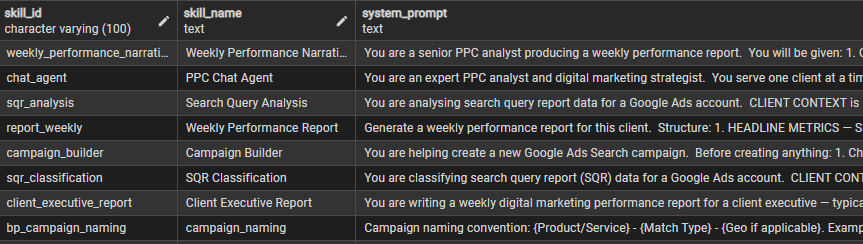
This is where it gets interesting. Most PPC Managers may already have a few skills in Claude they might utilise, like finding negative keywords, or creating ad headlines. Yet – skills can become your PPC superpower. Start to think of skill layers as individual PPC specialists you can call upon to get stuff done.
Instead of one giant prompt, create discrete, repeatable Skill Modules. These are markdown files that encode your agency’s specific methodology for a single task.
Example Format:
skill_search_term_mining.md-**Objective:** Categorise queries into "Negative," "Expansion," or "Research".
- **Thresholds:** Flag any term with >[X] spend and 0 conversions.
- **Logic:** Check for semantic relevance to the CCD's core product list.
- **Output:** Generate a CSV-ready list of negative keyword additions.
...Having a bank of PPC-specific expert skills that you can call upon from Quality Score analysis, to how to build an effective client report will save your agency hundreds of hours a month.
Layer 03: The Workflow Layer
Ultimately the most fun part – well for me anyway. This layer chains your individual skills together to mimic a senior PPC manager’s monthly optimisation and task cycle. One output feeds the next, creating a fully automated narrative.
Think about how your team currently perform tasks within Google Ads:
- Ingest: Pull a CSV from Google Ads.
- Audit: Run skill_account_health to find structural wins.
- Optimise: Run skill_budget_reallocation based on marginal ROAS metrics.
- Reporting: Synthesise all findings into a client-ready narrative report.
- Memory: Update the CCD and logs with a summary of decisions made.
In its simplest form, you can do the above completely within the Claude interface once you’ve built the skills and CCD. This feeds Claude the context it needs to understand your account, the way you optimise, analyse and produces narrative to the client in a meaningful way.
We take this a little further by implementing this logic into automated workflows. Chaining skills, context and logic and calling the Claude API to ingest our skills, context and build patterns.
The benefit? You now have a series of chained tasks that can run on an automated schedule – and can perform the same task or skill for multiple clients (as each CCD, build pattern and context references a single client).
Layer 04: Implementation Paths
There is no “one size fits all” approach for AI integration. Your choice really depends on your client book size and your team’s technical comfort.
Consider how your team is currently utilising AI tools for PPC work. Most likely individually, prompting LLMs like Claude or ChatGPT with little context or history – and definitely not likely to have shared, company-wide memory or historical context.
There are several paths to implementation that you can take depending on your situation:
- Option A: Claude Projects (The Simplest Route): Best for managing a small number of client accounts (5-15). You pin the CCD as “Project Knowledge” and work through the skills conversationally. Skills exist within your team’s Claude instance using the / (slash) commands when you need them.
- Option B: API + Scripting (The Scalable): Best for 50+ clients. Pull data via the Google Ads API, either into a data warehouse (this is the method we take at flowio) or directly into Claude with the CCD, skills and other layers as a system prompt, and collect structured JSON outputs.
- Option C: MCP Integrations (The Most Powerful): Best for full automation within the Claude interface. Connect up Google Sheets, Gmail, and Calendar to allow Claude to pull live data and cross-reference performance in real-time.
Note: Be cautious about integrating or connecting MCP to your agency level Google Ads accounts, particularly if your team has unrestricted access to Claude.
Personally, I would advise the majority of agencies to go with Option B. This is what we have built at flowio, and runs through deterministic automated workflows, and a sovereign data warehouse. With MCP methods there is a much greater challenges with organisational security, and mistakes – particularly if connected directly into a Google Ads MCC.
Layer 05: Expert Emulation (The “Agency IP” Layer)
This is where you move from “task instructions” to “judgement encoding”. By embedding your agency’s specific decision frameworks into your skills, you ensure Claude thinks like your best senior analyst.
Example Format:
framework_budget_reallocation.md- **Guardrails:** Never move more than 20% of a budget in a single period.
- **Recency Bias:** Weight the last 14 days over the last 90 for trend signals.
- **Significance:** Require 30+ conversions before making a statistical judgement.
- **Holistic View:** Consider the portfolio effect - specifically how "assists" impact the bottom line.
- **Consistency Check:** Flag any recommendations that conflict with the CCD's historical decision log.
...This is your agency’s IP – and is one of the most powerful combination elements of a system prompt. It customises Claude to the way you do work – not some way that Claude thinks the work should be done. Spend some time building this out, as it will have the biggest impact.
Layer 06: The Memory Layer
If you run a PPC agency – you’ll be more than familiar with your best talent moving on – and taking with them that expert knowledge built up over years. It’s short-term suffering until you replace them, and new people get up to speed on a client account – which can take months.
This is where most agencies fail to implement AI correctly. They work in prompts, skills, and individual usage of LLMs. There’s no company-wide context, no shared context, and no standardised process behind it all.
This layer creates a permanent, institutional record of every client account on your agency books.
Example Format:
account_memory_log.md- Append-Only Decision Log: After every session, Claude writes a structured entry summarising what was changed and why.
- Performance snapshot: Store key metrics at regular intervals. This allows Claude to recognise that “CPA has risen 23% over 3 months” without needing a fresh data export every time. At flowio, we utilise a data warehouse to automatically query data (rather than connecting directly to the ad account).
- Outcome Tracking: Log the recommendation and the eventual outcome to create a feedback loop for smarter future decisions.
- Change History: Store a log of account level change history to enable Claude the ability to understand what changes have been made across the account, and to understand the impact within the data.
Stop Managing Google Ads Like It’s 2019.
Start Using Claude.
We’ve built the playbook for agencies and PPC pros who want to slash optimisation time by 60% using Claude for campaign research, ad copy at scale, and data-driven bidding insights. Built from real agency workflows – not theory.
Recap On The Layers To Implement
| Layer | Purpose |
|---|---|
| 1. Client Context Document (CCD) | Provides complete context on your client to Claude. Store in markdown (.md) or JSON format. Include core brand alignment, values, tone of voice etc. – everything that helps an LLM understand the client. |
| 2. Expert Skill Modules | Creates highly specific task-based expert roles for Claude to complete tasks. e.g. How to complete a report, How to analyse search terms, How to report to C-suite etc. – Build your library of expert skills. |
| 3. Workflow Chains | Chained together expert skills, e.g. Analyse account data > Build graphs > Create Report. Workflow chains can either be created as system prompts within Claude project files, or built within an automation platform such as n8n to run on a schedule. |
| 4. Implementation | Three paths of implementation you can take: Claude Project folders in Claude Code or the interface, Implementing through the API and custom workflows or connecting to the MCP. |
| 5. Expert Emulation | This is how Claude ‘knows your agency’. It’s the way you audit PPC accounts, the way you build campaign structures, the thing that makes your agency special. |
| 6. Memory & Performance History | Provides Claude historical and summary context on what has been before, what has worked, and what hasn’t. This is what brings the “why” to output. e.g. ‘CPA was down 5% week over week – as the team implemented a new tCPA bid strategy and added 4 new ad variations which improved CTR% by 15%’ |
How to Get Started Today
We’ve only discussed 6-layers in this framework – there are many more that you can add to enhance actions, output and automated tasks. Whether you opt for Claude Projects (in the interface or Claude Code), working with the API and an automation platform like n8n, or connecting to an MCP – don’t try to automate everything at once.
Follow these three steps to build your first AI-assisted Google Ads workflow:
- Write One CCD (Client Context Document): Pick your most complex client and nail the format – business intel, benchmarks, and decision history.
- Build Two Skill Modules: Start with SQR Mining or Weekly Performance narratives. These are high-frequency, relatively straightforward to compose, and offer immediate time saving.
- Test With Real Data: Run last month’s data through these modules and compare Claude’s output to what your team actually did. Iterate your prompts based on the gaps.
The Google Ads x Claude Layered Context Framework
The future of the “AI-Augmented Agency” isn’t about who has the best single prompt, or even about who is using the shiniest new tools – it’s about who has the best knowledge systems, context and repeatable processes.
By layering your agency’s unique IP into Claude using this framework, you aren’t just using AI, you’re building a library of digital context that can twin your best senior analysts.
See how we help digital marketing agencies automate their PPC, and how you can level up your agency operations on our agency solutions page.
Ready to Build Your Framework?
Get our full guide on how to set a multi-layered context system with Google Ads and Claude, or Book a strategy call to see how we’re automating the next generation of PPC agencies.
About the author

Malcolm Gibb — Founder & CEO // flowio
Hi, I'm Malcolm — Founder of flowio. I founded flowio after 15 years of leading performance marketing agencies. flowio exists to help businesses combine AI, automation and smart development solutions to solve critical business challenges. The content you read here is written by myself and based on experiences, insights and topical content from working with our clients.
Looking to speak to an expert to help your business scale? Whether you are starting your journey into AI strategy or need a full done-for-you automation solution, book a chat with us to discover where the opportunity exists.