Workflow PlatformsGuide
5 n8n Build Patterns for Production-Ready Workflows
- By
-
 MalcolmFounder & CEO, flowio
- Published
- Reading time
- 12 minutes
- Filed under
- Workflow Platforms
7 sections In this article
Treat your n8n workflows like a professional software engineering codebase. There is a big difference between an automation that has been thrown together in 5 minutes, compared with a workflow ecosystem that has been carefully architected with expert n8n build patterns to prevent issues.
There’s a particular sinking feeling that comes the first time an n8n workflow you built quietly breaks in production. It ran perfectly the first time when you were watching it. You switched it on, moved on to the next thing, and a few weeks later your business is suddenly grinding to a halt because of a critical workflow that is failing. You open n8n to view the executions to a wall of red. Nothing flagged it, and nobody knew.
That gap, between an automated workflow that works once on your screen, and one that you can trust to run critical operations within your business, or unattended for real customers is where most of the hard-won lessons live. n8n makes the first part wonderfully easy, which is why it’s so easy to skip the second. Bringing a software engineering mindset to your workflow stack can turn a fragile automation that breaks with the slightest edge case into a robust workflow ecosystem that can self-heal.
Over the past year building with flowio I have seen it all – silent fails, webhook exploitation, configuration issues, and workflows that are overly complex when simplicity is required.
There is nothing worse than trying to debug an automation failure you built 6 months ago without any documentation to speak of, or finding out a workflow you thought was running was silently failing for weeks without any alerts. And, when your automation expands exponentially (we have over 300 workflows to manage) we needed to start finding repeatable, automated ways to keep workflows healthy and running.
Coming from a development background – I started to deploy simple build patterns into our n8n workflows taken from similar methods used in software engineering to automate workflow health. Repeatable build patterns that are now part of every build. n8n build patterns that save significant time in debugging, provide real-time alerts – and more importantly ensure our clients can rely on every execution working as intended.
I’ll run you through 5 of our top n8n build patterns that can turn your n8n automated workflow into a production class system that is reliable, scalable and hardened.
These patterns are straightforward to implement – and can be built entirely within n8n without external tool dependencies, but can be extended to bolt-in any other tools you use (e.g. we use third party tools such as postgreSQL for database logging, Gotify for alerting etc.).
n8n Build Pattern 1: Configuration as data
Picture a workflow you’ve built in n8n for a business – say a heating company that books boiler call-outs. Hardcoded into its nodes are all the little decisions that make it theirs: the postcodes they serve, the hours they take bookings, the wording of the text in their messages, the contact details to send alerts. It works, everyone’s happy.
Then the client ends up expanding into a new area, and you need to add 10 new postcodes and new messaging. You open the workflow, hunt down the node where the list lives, edit it, save, redeploy. A fortnight later they change their booking hours – back in you go. Then you try to replicate the build, and have to start swapping values by hand, node by node – with mistakes creeping in easily.
This is the quiet tax of hardcoding any variable within logic. It seems easy at the beginning, but becomes a nightmare to maintain, or scale.
The fix is a principle borrowed from software engineering – keep your configuration separate from your logic. The steps the workflow performs stay in the workflow. The settings – anything that changes from client to client, or that you might want to tweak later move out to a table.
n8n has a brilliant in-built environment variable system for this exact purpose, where you can easily manage full instance environment variables, and if you have this within your plan and instance it is one method worth employing (particularly for smaller set variables), but it’s not as robust a solution for any lengthy content or lists of postcodes.
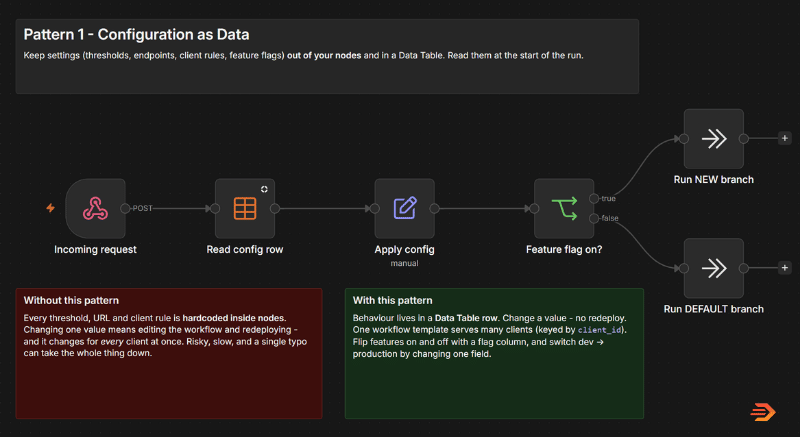
This is where n8n Datatables come in. Think of an n8n Datatable as a simple spreadsheet that lives directly inside your n8n instance – you create one called something like client_config, give it a row for each client, or workflow you need different variables for, and put individual settings in each column. At the start of the run, n8n looks up the right row in your Datatable and carries those values through everything that follows.
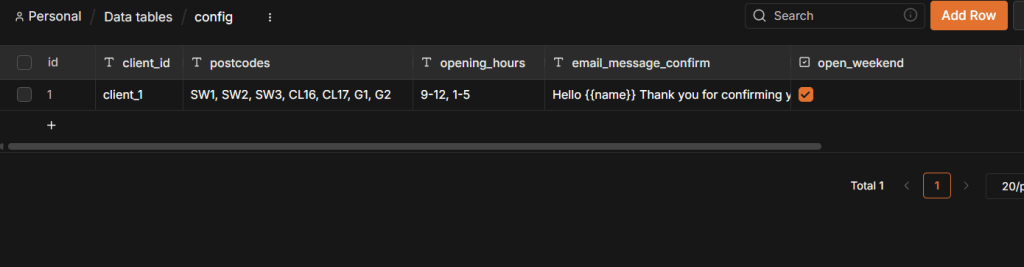
The difference this makes is in the day-to-day.
Those 10 postcodes? Edit a single cell. No opening the workflow, or redeploying and testing. The workflow logic remains the same – it’s only input variables that change. No chance of breaking nodes while you reconfigure.
It also quietly solves a scaling problem. Rather than having separate versions of the workflow to test out new features or branches – you can easily configure an n8n datatable to act like a development and production environment. Gate your workflow to look for an environment flag and have a ‘test’ row where you can turn new features on or off for your clients without redeploying or breaking existing logic during updates.
Between the two build patterns, the rule of thumb is straightforward. Reach for environment variables (or n8n’s Variables) when a value is short, flat and the same everywhere – a base URL, an environment name, a single shared key. Reach for a Datatable the moment your config is lengthy, structured, or differs from one client to the next. Most real builds use both, each for what it’s best at – and unlike Variables, Datatables are available on every n8n plan, so there’s no gate in your way.
n8n Build Pattern 2: Centralised error handling
I’ve seen many n8n workflows that completely ignore any error handling functionality. Businesses that have come to flowio for n8n workflow support because their n8n workflows are failing, and when I dive into their automations I’m often presented with a sea of red executions. API calls quietly failing, malformed data, dependency failures – all with no alerts or notifications.
Errors are silent in n8n.
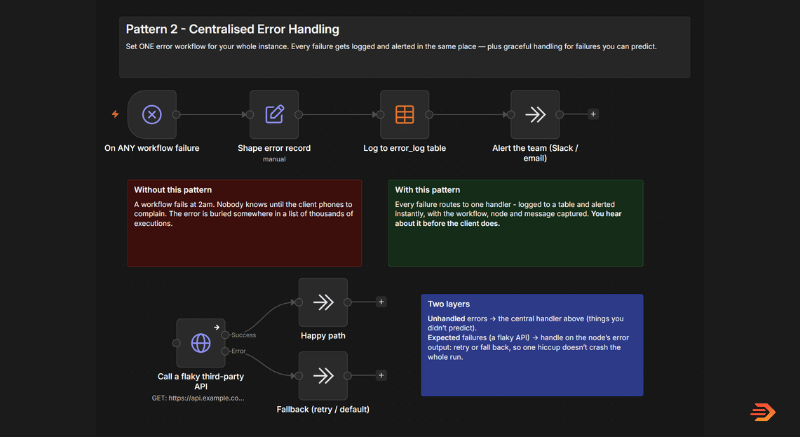
The fix is a two layered approach, and knowing which is which is most of the skill.
The first build pattern example in the screenshot is a single error workflow for your whole instance. You build one error handler – with it’s first node an error trigger – then point any workflow you have within your n8n instance to it from the settings.
Whenever any workflow fails across your instance – it will hit the error handler workflow and log exactly where the execution fails. After this, you can build in any alert system your business prefers, MS Teams, Slack, WhatsApp etc. so you know exactly when a critical workflow fails.
The second layer is for the failures you can see coming. A third-party API will occasionally time-out or rate-limit you, that’s not a bug with the workflow, it’s just what being dependent on third-party services is like.
You don’t need a predictable error to bring down a critical workflow ecosystem – so the fix is to build these cases in by design. It is surprising how many instances I have seen where workflows fail the minute an API time-outs or isn’t available.
The easy fix is within the HTTP request node itself – apply timed retries (e.g. 3 retry attempts every 3000ms) or continue the path without output.
The n8n build pattern in the screenshot shows the example where, if an API errors we push the path to a dedicated ‘error’ path and continue the run. This could be to retry the API, or to alert a human that the execution has failed at the API node. This is a relatively easy fallback build pattern to implement, whenever you have to depend on a third-party service or API.
n8n Build Pattern 3: Execution observability
If you’ve ever built high-volume n8n workflows, you know, the ones that have thousands of executions per day – then you’ve probably also had the headache of trying to debug it.
Everything might be green – it’s working fine, but the workflow isn’t doing what it’s supposed to do. Nothing is obviously broken. A single confirmation email hasn’t gone out, a record hasn’t been updated correctly. Trying to search through thousands of n8n executions starts to become a full-day task.
This is the observability gap, and it’s a different problem from the last one.
Pattern 2 makes sure you know when something breaks. This pattern makes sure that, for any run, the failures and the successes alike – you can find it and explain exactly what happened.
In software, you’d never run anything in production without logs and a way to trace a single request through the entire system. This is where you should start treating your n8n workflows as software, and it comes down to two small habits.
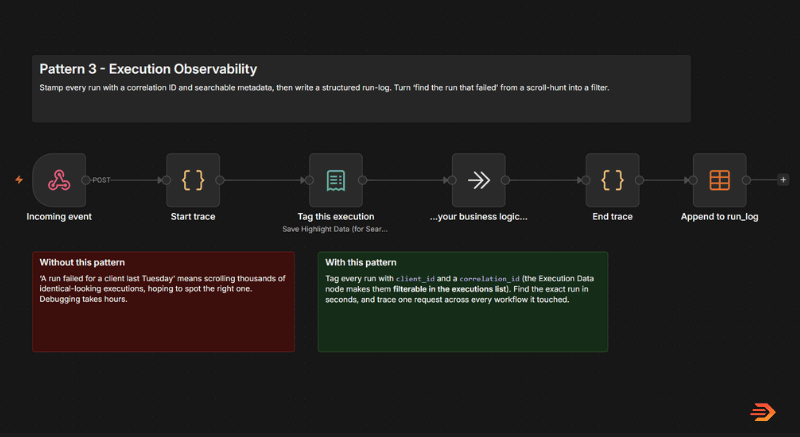
The first is to tag every run with the handful of things you’ll actually want to search by. A single node – or one line of code – stamps each run with say, the client it was for, a unique id for that request or the environment it ran in. n8n then lets you filter the executions list by those tags, so “show me the run for this client on Tuesday afternoon” becomes a two-second filter instead of scrolling endlessly through execution data.
The second is a correlation id – one unique id minted at the very start of the run and carried through everything it touches: every sub-workflow it calls, every external system. The value of this shows up later, when you’re looking at a line in a client’s CRM or a message in Twilio – you can match it straight back to the exact n8n run that produced it.
Implementing observability build patterns in your n8n workflows levels your flows up from simply running – to being able to pinpoint exactly what happened at each stage, how long it took to run, and the exact output.
n8n Build Pattern 4: Boundary hardening
Most automated workflows have a front door: a webhook URL that some other system calls whenever something happens. It’s how a booking system tells your workflow there’s a new job come in, or how a CRM nudges a workflow with a new lead. And out of the box, that front door trusts whatever turns up on the doorstep.
Here’s how that goes wrong, and it’s rarely dramatic. Picture the heating client’s booking system, firing a webhook to your workflow every time a job is created.
One afternoon the network hiccups, the booking system doesn’t hear back from your workflow quickly enough, so – being sensible – it assumes the message got lost and sends it again.
And maybe again.
Now the customer has three confirmation texts, the engineer’s diary has the same call-out booked three times, and nobody did anything wrong. That’s the gentle version. The less gentle one is someone who’s found the URL poking at it on purpose, or a malformed message sailing in and toppling the run somewhere deep inside where the error tells you nothing useful.
The principle is simple: never trust the incoming request. Treat the boundary – the point where outside data enters your workflow – as a checkpoint, with three quick guards that run before anything is allowed to act.
The first is to verify it’s really from who it says.
Most reputable systems sign their webhooks using a secret that only the two of you share. Your workflow recomputes that signature and compares – if it doesn’t match, the message didn’t come from where it claims, and it gets turned away. That alone shuts the door on forgeries and on anyone who has stumbled across your webhook url.
The second is to validate that it’s well formed.
Even a genuine sender will occasionally send something odd – a missing field, an empty value, a format that’s quietly changed on their end. A quick check that the payload looks like the way you expect means a bad message is refused politely at the door, rather than slipping through and failing over three nodes later.
The third is one that catches most people out: de-duplication.
If a webhook doesn’t respond with the correct status codes (to say it’s received successfully) a system could send it’s data in again. The same event, running twice, or even thrice leading to multiple, duplicate entries. Pretty critical if you are doing anything with a CRM. It’s easy to implement a system that checks if it has run the same input before – if it’s new run the execution, if not skip it. That single look-up is the difference between booking one job and booking three identical jobs into a system.
The workflow build pattern below runs the guards in order – verify the signature, then only if it’s valid check whether you’ve seen the event before, and only then process it.
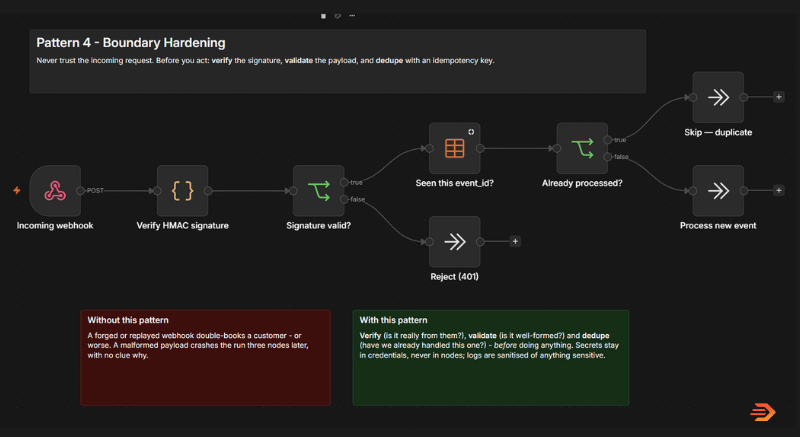
The payoff is that the automation starts behaving like a proper piece of software. It can’t be tricked into acting on a forged request, it won’t fall over on a bad one, and it won’t duplicate runs.
n8n Build Pattern 5: Heartbeat health check
Everything so far has been about making individual workflows well-behaved – configurable, loud when they fail, easy to trace, careful about what they let in. All of it good, and all of it will save you some headaches one day. But there’s a gap those patterns leave, and it’s a sneaky one: they rely on each workflow being set up properly.
Think about when your automation ecosystem expands. You originally had one important workflow live, now you have 50, all doing different things. Workflows go unmanaged, unwatched for weeks, months and easily break.
What you need is a watcher – a workflow that watches on a schedule from above across your entire n8n instance looking for failures, deactivated workflows or issues with running workflows.
n8n has it’s own instance level API which you can utilise to pull data from executions, workflows and more across your instance. A simple setup like the below can alert you to any issues immediately. The time fires, it calls the n8n API, and it either raises an alert or stays quiet.
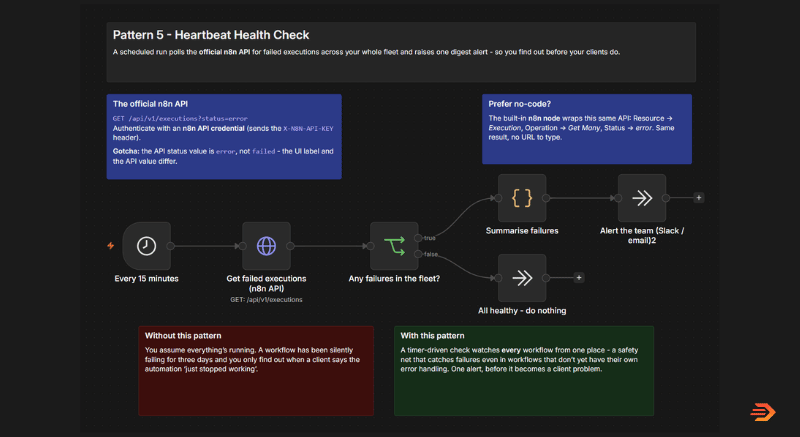
This simple workflow setup watches the watchers, which is why it makes a good last line of defence when monitoring for issues or errors across your n8n estate. You’ve got a single place that will alert you to failures or errors across all of your workflows. This also works across multi-instance setups (At flowio we currently manage 340+ workflows across 5 separate n8n instances, with some clients have 100+ workflows in a single instance) – with availability both within the Cloud version of n8n and the self-hosted. This makes managing issue tracking, monitoring for errors significantly easier than scrolling through workflow reports and execution logs.
In Summary
Some of these build patterns may seem simplistic, but when you start shifting your mindset to implementing these methods in every workflow – scale comes with ease. No more late nights debugging thousands of execution rows, or breaking logic with simple fixes. n8n is a fantastic workflow platform that lets you build critical business logic into automated workflows – building a workflow is only half of the task – the other is designing a robust system that will scale with your business.
At flowio we build scalable n8n workflow solutions for businesses of all sizes – whether it’s running a booking system, managing internal CRM systems, or deploying AI voice agents – we provide expert support from implementation, consultancy and workflow management. Drop us a chat to speak about how to scale up your automation stack with one of our experts.